.png?width=500&height=100&name=500x100px%20Hubspot%20(3).png)
A stock is a group of assets with at least one common property, for example, the same location, label or a specific activity. One or more common properties of the stock are defined using filters.
Automated notifications by e-mail or webhook allow you to monitor stocks even if you are not logged into the system. Stocks also provide you with the possibility to generate reports.
Create Stocks
- Open the BOX ID software.
- Select Stocks from the menu.
- Click the plus symbol. This will open the entry mask Create Stock.
- In the Name field, enter a distinctive name for your stock.
- In the field Description, you can include a more detailed description of the stock. This field is optional.
- Under Filter, individual rules or rule groups can be created.
NOTE: Without filters, all assets are listed. - Click Save to create the stock.
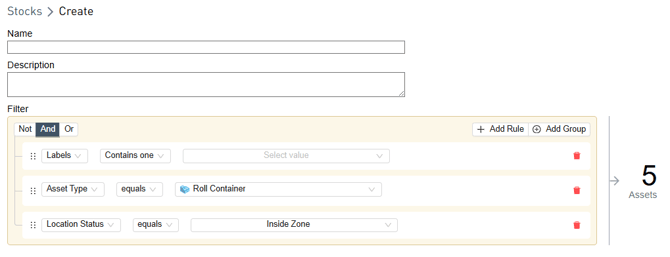
There are two logical groups for Filter:
- Logic to relate rules to each other
Not | And | Or
The selected relation is highlighted (white text on dark background).
- Condition within a rule, varies according to filter chosen, i.e. name differs from asset type
e.g.: equals | not equal | One of | None of