.png?width=500&height=100&name=500x100px%20Hubspot%20(3).png)
Requirements
- Mobile Device with Camera
- Min. iOS 15.1 / Min. Android 7
- Always use the latest App version
Download & Login
-
Download the Driver App from Google Play or App Store.
- Log-in with your email.
- Select your tenant to access the home screen.
| Google Store | App Store |
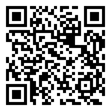 |
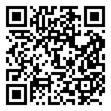 |
Before you can use the app, our team will set up your account, configure the required workflows, and add the relevant tags. Once this setup is complete, you’ll be able to start using the app without any additional configuration.
App Connectivity Status
The Box ID logo indicates the connectivity status with the server.:
 : connected (online).
 : not connected (offline).
Scans work offline. Uploading occurs only after the device reconnects to the Box ID server.
Next: Learn how to use your app.