.png?width=500&height=100&name=500x100px%20Hubspot%20(3).png)
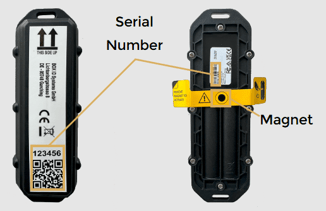
Each tracker comes with a unique serial number. You’ll find it on both the front and back labels of the device.
You need this serial number later to identify the tracker in the BOX ID software.
All devices are ready to use out of the box. Before shipping, every tracker has been:
-
Activated
-
Updated with the latest firmware and BOX ID configuration
-
Tested to ensure everything works correctly
Mounting Recommendations
To get the best performance from your tracker, keep these tips in mind:
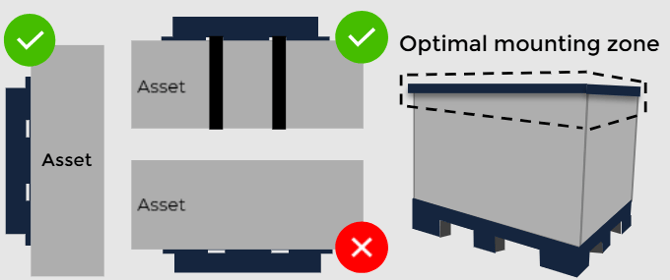
- Choose a protected location where the device won’t be hit by forklifts or other equipment.
- Mount it as high as possible and away from impact zones.
- Avoid placing the tracker inside or behind metal surfaces, as this can reduce signal strength.
- Try to avoid areas with high temperatures.
Mounting Instructions
Follow these steps for a secure installation:
-
Make sure the mounting area is clean and dry so the adhesive sticks properly.
-
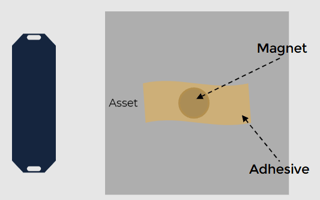
Fix the magnet to your asset using adhesive.
-
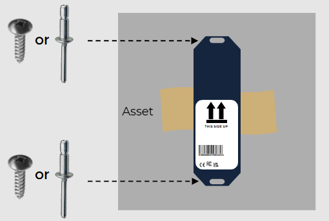
Place the tracker so that the opening on the device aligns with the magnet. Make sure the label is facing downward once installed.
-
Use two screws or rivets to firmly attach the tracker to the asset.
Once your tracker is mounted, you’re ready to start the BOX ID pairing process.