.png?width=500&height=100&name=500x100px%20Hubspot%20(3).png)
Unboxing
Each device has a label with a serial number. Find the serial number on the back and front labels. It is needed as tracker identifier in the BOX ID Software.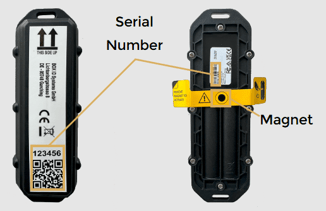
Before shipment, all devices are:
-
Activated.
-
Updated to the latest firmware and Box ID specific configuration set up.
-
Tested on correct functioning.
-
Packed into the required shipment sizes.
That means that all devices are working out of the box.
Mounting Recommendations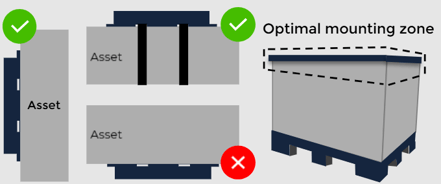
-
Mount the device in a protected position, where it will not be damaged by forklifts or other vehicles.
-
Mount in a high, impact-free, non-metal-enclosed location for best signal.
- Avoid mounting in a location that will result in elevated temperatures.
Do not enclose the tracker in metal, as this impacts connectivity.
Mounting Instructions
-
Clean the surfaces before mounting.
-
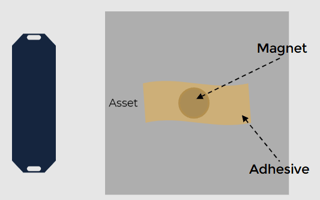
Attach the magnet to the asset to be tracked using adhesive.
-
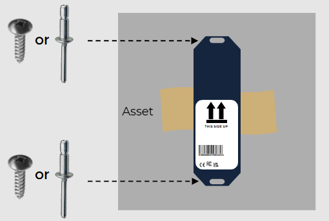
Position the device with the intended opening over the magnet and secure it on the asset using 2 screws or rivets.
-
Place the label at the bottom of the device when mounted.
After mounting the BOX ID pairing process can begin.